

“A binary clock is a clock which displays traditional sexagesimal time in a binary format.” -from wikipedia.org
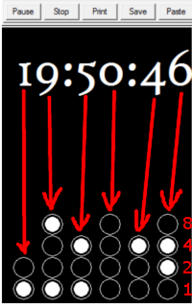
The binary clock uses circles that carry the value of 2 to the power of x. The variable would be whatever the number of circle is in its respective column. The values are added together to get the value of each column (ones in seconds, ones in minutes, ones in hours... etc.). Each column is aligned with its respective value on the top, excluding the colons. As the time continues ticking and the numbers continue changing, the circles representing the values will also change accordingly.
With the three-lined clock, the number of circles in each column (three columns in total) increase as the numbers' values will also increase. From the left to right, the first column represents the hours, the middle one represents the minutes and the last column represents the seconds. For the three-lined clock, the alignment ratio is 2:1, digital value (the actual time at the top, in large font) to column, colons excluded.
Install Turing and download the binary clock executable to the desired directory. Then, open the directory and double click the .exe file to open the binary clock. The user will be presented with a choice of background colour [Figure 1]. To choose one of the colours listed, enter the number that corresponds to the colour/menu choice using the number pad and then press the enter or return key. If the user wishes to select the default settings and skip the customization steps, that is also an option. The title sequence will then initiate, fading into the background colour selected by the user [Figure 2]. If the user didn't select the 'default' settings, then the user will get to select the type of clock [Figure 3] by clicking the desired clock type and then pressing space bar. Regardless of the choice, the user then specifies the colour of the filled in and empty circles to be used in the binary clocks [Figures 4 & 5]. Once all the choices have been selected and are valid (see Troubleshooting for more information) the clock of the specified type will be displayed, along with the current time, displayed digitally [Figure 6].

Picture used in header and sidebar: Binary Code Consider the Binary Code, < http://www.twited.com/consider-the-binary-code-c-000000-101010-010011-110010-111111/> retrieved January 17,2011