Printer Comparison
As a grade nine student, new into high school, I realize that the need to print out all the work done both in and out of class is exponentially rising. One of the printers I have at home needs to be replaced so I did a little research on the available and affordable printers. The most common types were laser and inkjet.
I'm looking for particularly black and white printers, not all-in-ones. I have a printer at home that specializes in colour and photo printing. Since the printer will be used for everyday use around my home and at school, I need something reliable and long lasting. I really don't need a situation where I have a project due the next day and the printer stops working the night before.
Also, since I have three computers, one desktop and two laptops, the printer would have to be shared through three people. The printer should have a decent speed. My father tends to print multiple, and sometimes, unnecessary copies of the same document, as do I. A project needs to be revised and edited numerous times, so printing speed is a very important factor. When there's a rush for time, I cannot be waiting five minutes for the printer to process twenty pieces of paper.
Laser vs. Inkjet
|
Laser |
Inkjet |
| Hardware |
The bulky laser printer will be much greater in expense, when first bought, compared to the inkjet printer; up to three times as much. Also, the laser printers are designed for heavy usage and are more reliable than inkjet printers. |
Inkjet printers, which tend to be much smaller, are often made with scanners, photocopiers and fax machines. The starting cost is much more acceptable. Inkjet printers are so inexpensive that they are usually replaced instead of repaired, adding to replacement costs. |
| Consumables |
Laser toner cartridges print far more sheets in comparison to the cost than inkjet cartridges. One toner will usually last for 8000 pages. However, this means that the sole cost of the toner will be approximately twice that of an ink cartridge. Thus, laser printers should be used for those who have large printer task, very often. |
Inkjet cartridges are relatively more expensive than laser toner when taking into account when many pages per dollar. The cartridges will often not say how many pages it will print as this is dependable on factors such as cartridge design and expiration date. This type of printing is suitable for small printing jobs. |
| Printing Quality |
Laser printers tend to print higher quality text documents because they use a complex method of actually binding toner, a mixture of color and a plastic powder, to the fibres in the paper; but for the same reason, laser printer, even the colour lasers, will not give the same effect as inkjet printers. |
Inkjet printers produce droplets of ink that are susceptible to bleeding, so they tend to print higher quality photos, but only on photo paper that reduces bleeding. So when printers are are often used with the setting turned on drift. |
| Speed |
For laser printers, speed is relatively unaffected by the complexity of the document or photo. |
For inkjets, printing speed is directly related to quality; the lower the quality, the faster the printing. |
Printer information on this table of the website comes from multiple articles from eHow. Taken: 2010-11-18
Considering durability, speed and the overall cost, I have chosen to convince my father to begin looking at particular models of laser printers. I can't afford to own a printer that runs out of ink very fast. The reason why I need a new printer is due to the fact that my old one requires a cartridge every other month. Although, the inkjet printer would take up less room, the fact that the laser printer is much faster and the quality of printing black and white text is supposedly much clearer and shaper. For my father the brand is the big factor in this decision, because he refuses to buy anything without a minimum of a warranty limit. I have decided to prepare another table with a couple of the best models I can find.
HP Models
|
HP LaserJet P2035n Monochrome Laser Printer |
HP LaserJet P2055dn Laser Printer |
| Appearance |
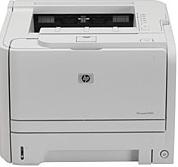 |
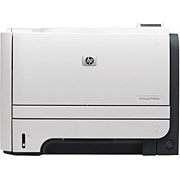 |
| Price |
- Printer: $399.99
- Toner: $129.95
- Paper (500 sheets): $8.99
- Extension USB Cable: $34.95
- Total Tax (HST): $74.56
- Total Price to Start: $648.45
|
- Printer: $524.40
- Toner: $185.95
- Paper (500 sheets): $8.99
- Extension USB Cable: $34.95
- Total Tax (HST): $98.07
- Total Price to Start: $852.42
|
| Print Speed |
Black Up to 30ppm/ 8.0 sec first page |
Black Up to 30ppm/ 8.0 sec first page |
| Monthly Duty Cycle |
Up to 25,000 pages |
Up to 50,000 pages |
| Warranty |
1-Year Limited |
1-Year Limited |
| Others |
- 1 USB 2.0 port, built-in HP Fast Ethernet print server
- 50-sheet multipurpose tray, 250-sheet input tray; 150-sheet output bin
- Media types supported include paper, transparencies, labels, envelopes, cardstock
- Includes CD-ROM (includes User's Guide and software)
- Networked printer
|
- Hi-Speed USB 2.0 connectivity
- 250-sheet input tray, 50-sheet multipurpose tray
- Letter, legal, statement, executive, index cards, and envelopes
- Paper sizes supported 3" x 5" to 8.5" x 14", 4.1" x 5.8" to 8.5" x 14"
- Get clear, sharp-looking pages with highly rated HP cartridges
- 128MB of internal memory
- Reduce operation noise with quiet mode
- Stand-alone printer
|
Printer information on this table of the website comes from STAPLES | BUREAU DE GROS. Taken: 2010-11-18
My family doesn't print enough material that the monthly duty cycle will have an effect on the use and we rarely print anything that isn't standard paper size. The quality of the printing is the most important factor to me. However, both these models will provide excellent printing, according to the customer reviews I read. Since both will provide more than enough power, I have chosen due to the factor of cost. My family will buy the first printer: LaserJet P2035n Monochrome Laser Printer. I normally use a USB key to transfer files from one computer to another so a stand-alone printer isn't necessary.
I predict that during my four years of high school, if I buy a new toner cartridge every year, the total cost including paper and the necessary cables, it will cost approximately a thousand dollars. I'm going to be ready for whatever printing jobs the teachers will throw at me!
 Back to Homepage


Background graphic seen on this section of the website comes from Free Wallpapers. Taken: 2010-09-16
Printer graphics seen on this section of the website comes from STAPLES | BUREAU DE GROS. Taken: 2010-11-18